AI Client Intake: How to Automate Your First Impression and Capture Every Lead
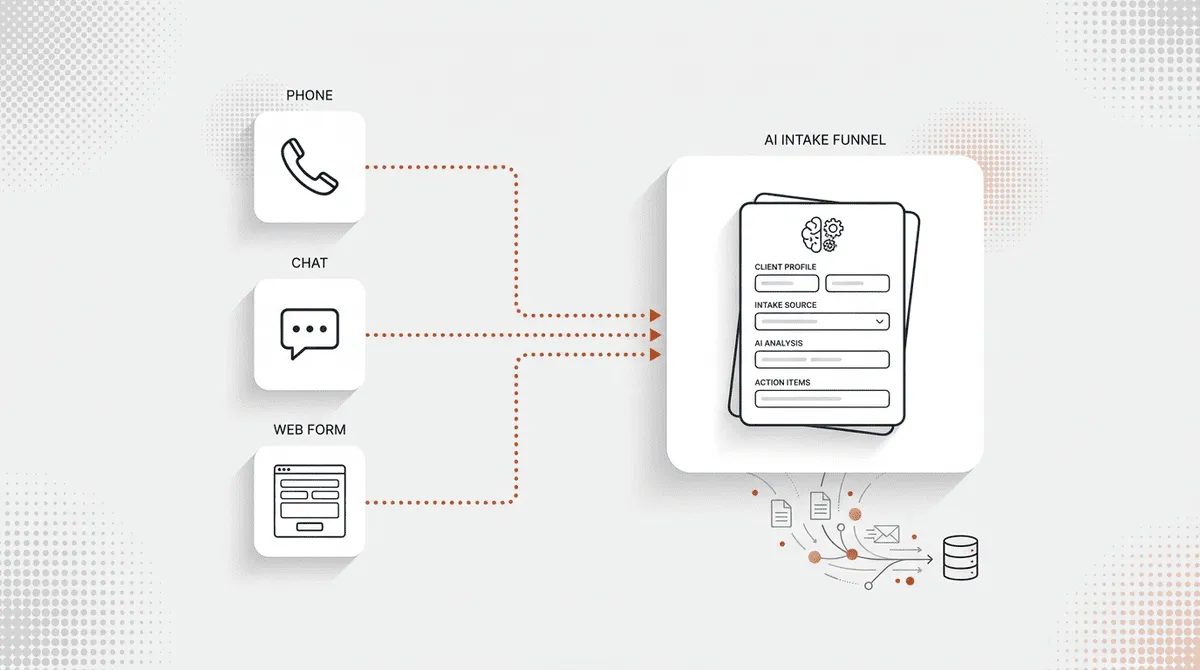
Table of Contents
- What Is AI Client Intake
- How Traditional Intake Falls Short
- What AI Brings to the Intake Process
- How AI Client Intake Works
- Step 1: First Contact
- Step 2: Information Gathering and Qualification
- Step 3: Smart Routing and Handoff
- Step 4: Automated Follow-Up
- Key Benefits of Automated Client Intake
- Faster Response Times Convert More Leads
- 24/7 Availability Without Extra Staff
- Consistent Screening Eliminates Guesswork
- Lower Cost Per Intake
- AI Client Intake Across Industries
- Legal: Case Screening and Conflict Checks
- Healthcare: Patient Intake and Triage
- Home Services: Job Scoping and Scheduling
- Real Estate: Lead Qualification and Showing Bookings
- How to Implement AI Client Intake in Your Business
- Audit Your Current Intake Process
- Define Your Qualification Criteria
- Choose the Right AI Intake Platform
- Set Up and Test Before Going Live
- AI Client Intake vs. Traditional Intake: Key Differences
- Best Practices for AI-Powered Intake
- Keep the Human in the Loop
- Integrate with Your CRM from Day One
- Review and Optimize Monthly
- Ensure Compliance and Data Security
Table of Contents
A potential client calls your office at 6:47 PM on a Tuesday. Your staff left at five. The phone rings four times, hits voicemail, and that person calls the next business on their list. You never even knew they existed.
This happens constantly. Research from Lead Connect shows that 78% of customers buy from the company that responds first, yet the average business takes 47 hours to follow up on a new inquiry. That gap between “first contact” and “first response” is where most leads die. AI client intake closes it completely.
Instead of voicemail boxes and callback lists, an AI intake system answers immediately, asks the right questions, captures structured data, and routes qualified leads to your team in real time. It works at 2 AM on a Saturday the same way it works at 10 AM on a Monday.
This guide covers everything you need to know about automated client intake: what it is, how the technology works, where it fits across different industries, and how to set it up in your own business.
Key takeaways:
- AI client intake responds to every inquiry instantly, 24 hours a day, 365 days a year
- Businesses using intake automation see faster speed-to-lead and higher conversion rates
- The technology works across legal, healthcare, home services, real estate, and other verticals
- Implementation takes days, not months, and costs a fraction of hiring dedicated intake staff
- AI handles routine screening while routing complex or sensitive cases to humans
What Is AI Client Intake
AI client intake is the use of artificial intelligence to automate the first interaction with new prospects. An AI system answers calls, captures contact details, asks screening questions, qualifies leads, and routes them to the right person. All of this happens without manual staff involvement, 24 hours a day.
Think of it as a highly trained intake coordinator who never takes a lunch break, never forgets to ask a screening question, and never lets a call go to voicemail. The technology has matured rapidly over the past two years, and the best platforms now handle phone conversations that sound genuinely natural.
How Traditional Intake Falls Short
Most service businesses still rely on a manual intake process. A receptionist or office manager picks up the phone, asks questions, jots down notes (sometimes on a Post-it), and enters the information into a CRM later. Maybe.
The problems are predictable:
- Limited availability. If nobody is at the front desk, the phone rings out. After-hours calls, lunch breaks, bathroom breaks, staff meetings. Every gap is a missed opportunity.
- Inconsistent screening. One staff member asks five questions. Another asks three. A busy morning means shortcuts, and shortcuts mean incomplete data.
- Slow follow-up. Even when a message is taken, the callback might not happen for hours or days. By then, the prospect has moved on.
- Manual data entry errors. Misspelled names, transposed phone numbers, vague descriptions of what the caller needs. Garbage in, garbage out.
If your practice handles a high volume of evening inquiries, an after-hours answering service can plug the biggest gap. But the underlying problem goes deeper than hours of operation.
What AI Brings to the Intake Process
An AI intake process flips every limitation of manual intake on its head:
- 24/7 instant response. Every call, form submission, or chat message gets answered within seconds. No exceptions.
- Consistent qualification. The same screening criteria applied to every single prospect. No shortcuts on busy days.
- Structured data capture. Name, phone, service needed, timeline, budget, insurance details. All captured accurately and pushed to your CRM automatically.
- Immediate routing. High-priority leads get flagged and sent to the right person in real time. Routine inquiries are handled without any human involvement at all.
| Factor | Traditional Intake | AI Client Intake |
|---|---|---|
| Availability | Business hours only | 24/7/365 |
| Response time | Minutes to hours | Under 5 seconds |
| Cost per month | $3,500+ (staff) | $49 to $299 (platform) |
| Consistency | Varies by person | Identical criteria every time |
| Scalability | Hire more staff | Handles unlimited volume |
| Data capture | Manual, error-prone | Automatic, structured |
| Follow-up | Staff-dependent | Automated sequences |
How AI Client Intake Works
The process is straightforward, even though the technology behind it is sophisticated. Here is what happens from the moment a prospect reaches out to the moment they are connected with your team.
Step 1: First Contact
Someone calls your business number, fills out a contact form, or starts a chat conversation. The AI system picks up immediately. On phone calls, a natural-sounding AI receptionist answers with your business name and a greeting customized to your brand. No hold music. No “your call is important to us” recording. Just a direct, friendly voice that sounds like a real person.
Step 2: Information Gathering and Qualification
The AI follows a scripted intake flow that you define. For a law firm, it might ask about the type of legal matter, when the incident occurred, and whether the caller has representation. For a plumbing company, it might ask what is broken, how urgent the situation is, and whether the caller is the homeowner.
Every answer gets captured in structured fields. Not a free-text blob that someone has to interpret later, but clean, labeled data: name, phone number, service needed, timeline, urgency level, and whatever custom fields matter to your business.
Step 3: Smart Routing and Handoff
Once the AI has enough information to qualify the lead, it makes a routing decision. High-priority prospects (someone calling about an emergency, a high-value case, a ready-to-buy buyer) get transferred to a live team member immediately. Standard inquiries get scheduled for callback. Unqualified leads get a polite response and, if appropriate, a referral elsewhere.
The routing logic is fully configurable. You decide what constitutes a hot lead, a warm lead, and a cold contact. The AI applies those rules consistently every single time.
Step 4: Automated Follow-Up
After the call ends, the AI triggers follow-up actions automatically. The prospect receives a confirmation text message. Your team gets an email or Slack notification with the full intake summary. A CRM record is created. If an appointment was booked, calendar invitations go out to both sides.
No sticky notes. No “I forgot to call them back.” No lead sitting in a voicemail box for three days.
Key Benefits of Automated Client Intake
The advantages of client intake automation go beyond convenience. They show up directly in your revenue numbers and operational costs.
Faster Response Times Convert More Leads
Speed-to-lead is not a buzzword. It is a measurable predictor of conversion. Research from InsideSales.com found that contacting a prospect within five minutes of their inquiry makes you 100 times more likely to connect with them compared to waiting 30 minutes. After an hour, the odds of qualifying that lead drop by over 80%.
An AI intake process responds in seconds, not minutes. That alone can dramatically change your conversion rate, especially for businesses in competitive markets where prospects are calling two or three companies at the same time.
24/7 Availability Without Extra Staff
For service businesses, after-hours calls represent 35 to 40% of total inbound volume. Those are not casual browsers. People calling a law firm at 9 PM or an HVAC company at 6 AM have an urgent need. They are the highest-intent prospects you will ever get, and if you miss them, they are gone.
A virtual receptionist solves this for businesses that want a human touch. But for pure coverage at scale, AI intake handles unlimited simultaneous calls at any hour without overtime pay, shift differentials, or scheduling headaches.
Consistent Screening Eliminates Guesswork
When intake depends on individual staff members, quality varies. Your best receptionist captures detailed information and asks all the right follow-up questions. Your newest hire forgets to ask about budget or timeline. On a busy Friday afternoon, everyone cuts corners.
AI applies the same qualification criteria to every single prospect. The screening questions are always asked, the data is always captured, and the scoring logic is always applied. No bad days. No shortcuts.
Lower Cost Per Intake
The math is simple. A dedicated intake coordinator costs $3,500/month or more (salary, benefits, taxes, training). An AI intake platform costs $49 to $299/month depending on volume. Even at the high end, you are saving over $3,000/month.
For a detailed breakdown of how these numbers compare across different service types, check out our answering service pricing guide.
AI Client Intake Across Industries
Most articles about intake automation focus exclusively on law firms. That misses the bigger picture. AI client intake works for any service business that receives inbound inquiries, and the qualification logic adapts to each vertical.
Legal: Case Screening and Conflict Checks
Law firms have some of the most complex intake requirements. The AI screens for case type (personal injury, family law, estate planning), determines if the statute of limitations is an issue, captures incident details, and can even check for potential conflicts of interest against existing clients. Qualified leads route directly to the appropriate practice area attorney.
For a deeper look at how phone-based AI fits into legal operations, see our guide to AI answering for law firms.
Healthcare: Patient Intake and Triage
Healthcare practices use AI intake for symptom pre-screening, insurance verification, and appointment scheduling. A patient calling with a possible urgent issue gets flagged for same-day scheduling. Routine appointment requests get booked into the next available slot. Insurance details are captured upfront so the front desk does not have to chase them down later.
If you run a medical practice, a healthcare answering service that handles intake and triage frees your clinical staff to focus on patient care instead of phone calls.
Home Services: Job Scoping and Scheduling
For HVAC, plumbing, electrical, and similar trades, the AI captures job details (what is broken, how long the issue has been happening, property type), estimates scope, and books service windows. Emergency calls get routed to the on-call technician immediately. Routine maintenance requests get scheduled for the next available day.
Real Estate: Lead Qualification and Showing Bookings
Buyer and seller leads come in at all hours. The AI qualifies them (pre-approved? timeline? price range? specific neighborhoods?) and, for ready buyers, books showings directly into the agent’s calendar. Agents wake up to a full pipeline instead of a voicemail box full of callbacks.
For agencies looking to capture more leads, a real estate answering service built on AI keeps every inquiry from slipping through the cracks.
| Industry | Intake Questions | Routing Logic | Follow-Up Action |
|---|---|---|---|
| Legal | Case type, incident date, prior representation | Route by practice area, flag urgency | Retainer packet, conflict check |
| Healthcare | Symptoms, insurance, preferred provider | Same-day vs. routine, specialist match | Appointment confirmation, intake forms |
| Home Services | Issue description, urgency, property type | Emergency dispatch vs. scheduled visit | Service window confirmation, tech ETA |
| Real Estate | Budget, timeline, pre-approval status, area | Buyer vs. seller, agent assignment | Showing confirmation, listing packet |
| Dental | Pain level, insurance, last visit date | Emergency vs. routine, provider match | Appointment reminder, new patient forms |
How to Implement AI Client Intake in Your Business
Setting up automated client intake is not a six-month IT project. Most businesses go live within a week. Here is a practical roadmap.
Audit Your Current Intake Process
Start by mapping how inquiries flow through your business today. Where do calls come in? Who answers them? What questions get asked? How is the information recorded, and how long does it take to reach the person who can act on it?
Track your current metrics for two weeks: average response time, calls missed, calls sent to voicemail, and lead-to-appointment conversion rate. These become your baseline for measuring improvement.
Define Your Qualification Criteria
Before the AI can screen prospects, you need to define what a qualified lead looks like for your business. Build a simple scoring rubric:
- Must-have criteria: What makes someone a good fit? (Budget range, service area, case type, insurance accepted)
- Disqualification criteria: What rules someone out? (Outside service area, looking for a service you do not offer, no budget)
- Urgency indicators: What signals a hot lead? (Emergency language, ready-to-buy timeline, referral from existing client)
Write these down clearly. The AI will use them as its screening logic.
Choose the Right AI Intake Platform
Not all platforms are equal. When evaluating options, focus on these factors:
- Voice quality. Does the AI sound natural on the phone, or robotic? Call the demo line and judge for yourself.
- CRM integration. Does it sync with your existing tools (HubSpot, Salesforce, Clio, your EHR system), or does it create another data silo?
- Customization. Can you configure your own screening questions, routing rules, and follow-up sequences?
- Pricing transparency. Watch for hidden fees, per-minute billing, and overage charges. The best AI answering services offer straightforward per-call or flat-rate pricing.
- Compliance. If you are in healthcare or legal, verify HIPAA compliance and ethics rule alignment.
Set Up and Test Before Going Live
Do not flip the switch for all calls on day one. Start with a soft launch:
- Route after-hours calls to the AI first. This is the lowest-risk test because those calls are currently going to voicemail anyway.
- Listen to recordings. Review how the AI handles edge cases, unexpected questions, and difficult callers.
- Refine your scripts. Adjust screening questions, greeting language, and routing rules based on real call data.
- Expand gradually. Once you are confident in the quality, route daytime overflow calls, then all calls.
Most businesses find their sweet spot within two to three weeks of testing.
AI Client Intake vs. Traditional Intake: Key Differences
If you are still weighing the switch from manual intake to an automated system, this comparison lays out the practical differences.
Traditional intake relies on human staff to answer phones, ask questions, and record information. It works, but only during business hours, only as fast as your team can move, and only as consistently as your least experienced employee on their busiest day.
AI client intake operates continuously. The response is instant, the data capture is structured, and the qualification logic never varies. The cost difference is significant too: a dedicated intake coordinator runs $3,500/month or more in salary alone, while AI platforms start at $49/month.
| Factor | Traditional Intake | AI Client Intake |
|---|---|---|
| Availability | Business hours only | 24/7/365, including holidays |
| Response time | Minutes to hours | Instant (under 5 seconds) |
| Monthly cost | $3,500+ (staff salary) | $49 to $299 (AI platform) |
| Consistency | Depends on staff training | Same criteria every time |
| Scalability | Hire and train more people | Handles unlimited concurrent calls |
| Data accuracy | Manual entry, prone to errors | Automatic, structured fields |
| Follow-up speed | Staff-dependent | Automated within seconds |
| Annual savings | Baseline | $38,000 to $41,000 vs. staff |
The comparison is not even close on paper. The one area where traditional intake still wins is empathy. A skilled human intake coordinator can read emotional cues and respond with genuine warmth in ways that AI has not fully replicated. For highly sensitive situations (a personal injury client in distress, a patient describing symptoms), human involvement still matters.
The smart approach: use AI for the 80% of intake interactions that are routine, and route the 20% that need a human touch to your best people. That way, your staff spends their time on the calls where they add the most value.
Best Practices for AI-Powered Intake
Getting the technology in place is step one. Getting the most out of it requires a few ongoing habits.
Keep the Human in the Loop
AI intake should augment your team, not replace your judgment. Configure your system so that high-value or emotionally sensitive calls route to a live person. Let AI handle the volume, screening, and after-hours coverage. Let humans handle the conversations that require nuance.
Integrate with Your CRM from Day One
If your AI intake tool does not feed data directly into your CRM, you are just creating a fancier voicemail system. Every lead should auto-sync to your pipeline the moment the call ends. No manual re-entry. No export/import spreadsheets. This is non-negotiable.
Review and Optimize Monthly
Pull your call recordings and intake reports once a month. Look for patterns:
- Are prospects dropping off at a specific screening question? Simplify it.
- Are qualified leads not converting after handoff? The problem might be in your follow-up process, not the intake.
- Are unqualified callers getting through? Tighten your scoring criteria.
AI intake is not set-and-forget. The businesses that get the best results treat their screening logic like a living document that improves over time.
Ensure Compliance and Data Security
If you operate in healthcare, verify that your platform is HIPAA-compliant with proper encryption and access controls. Law firms should confirm that the AI meets state bar ethics guidelines for client communication and data handling. All businesses should understand where call data is stored, who has access, and how long recordings are retained.
This is especially important for firms considering AI answering for law firms, where confidentiality is not just best practice but a professional obligation.

AI Communications Specialist
AI Communications Specialist at Synvola. 7+ years in telecom and voice AI, translating complex tech into business value.